mcp-geo — the AI visibility MCP server.
Track ChatGPT, Claude, Perplexity, Gemini, and Google AI Overviews citations of your brand. MIT licensed. Self-host on your own Cloudflare account.
- MCP tools
- 6
- AI engines
- 5
- Setup time
- ~5 min
- License
- MIT
About
What is mcp-geo?
mcp-geo is an open-source Cloudflare Worker that exposes 6 Model Context Protocol (MCP) tools for tracking how your brand is cited by AI search assistants. It runs prompts against ChatGPT, Claude, Perplexity, Gemini, and Google AI Overviews, then stores the raw citations and computed visibility metrics so you can query them from any MCP client.
It self-hosts in about 5 minutes on Cloudflare's free tier. You bring your own engine API keys — and you only configure the ones you actually want to use. Gemini's free tier covers most solo users.
Built for indie SaaS founders, solopreneurs, and small marketing teams who want to track AI visibility without paying for a bloated enterprise SEO suite.
What it produces
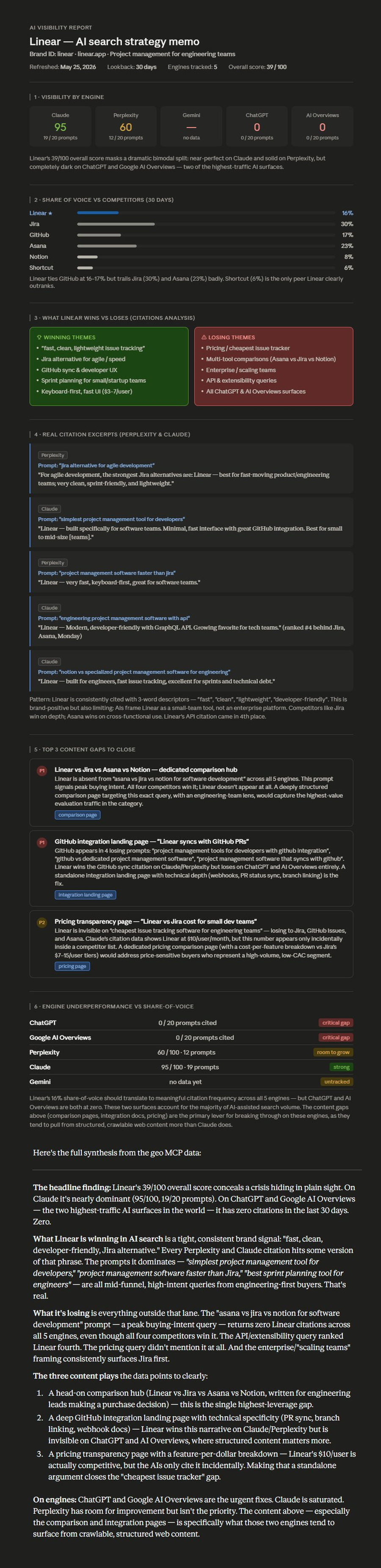
Ask Claude — through the geo-mcp connector — to analyze a brand, and within 90 seconds you get a strategist-quality memo grounded in real per-engine data. Below is a real example.
The full report continues below with content gaps, engine breakdown, and synthesis. Click the image above to view it all.
Features
What's inside
Six MCP tools you can call from Claude, Cursor, or any other MCP client.
check_visibility Current visibility score per engine.
get_visibility_history Trends over time.
compare_competitors Share of voice vs your competitor set.
get_citations Raw mentions across all engines, with context.
get_content_gaps Prompts where competitors win and you don't.
refresh_brand Trigger a fresh scan on demand.
Engines
Supported engines
- ChatGPT
- Claude
- Perplexity
- Gemini
- Google AI Overviews
Each engine is opt-in. You only configure the API keys you actually have — the worker simply skips engines whose credentials aren't set.
Setup
Use it in Claude.ai in 60 seconds
- In Claude.ai → Settings → Connectors → Add custom connector.
-
Paste your worker URL after deploy (looks like
https://YOUR-WORKER.YOUR-SUBDOMAIN.workers.dev/mcp). - Leave OAuth fields blank.
- Authenticate.
-
Ask Claude:
"Check the AI visibility for brand_id acme."
Deploy
5-minute self-host on Cloudflare
git clone https://github.com/AKzar1el/mcp-geo.git
cd mcp-geo
npm install
npx wrangler login
cp wrangler.example.jsonc wrangler.jsonc
# ... create KV/D1/secrets per SETUP.md
npx wrangler deployHosted version
Don't want to self-host?
Join the hosted waitlist — managed infrastructure, scheduled scans, no API keys to set up, a clean web dashboard, and included AI Overviews scanning.
Star the repo. Self-host in 5 minutes.
MIT licensed. 5 AI engines. Native MCP integration.
Full AI visibility report